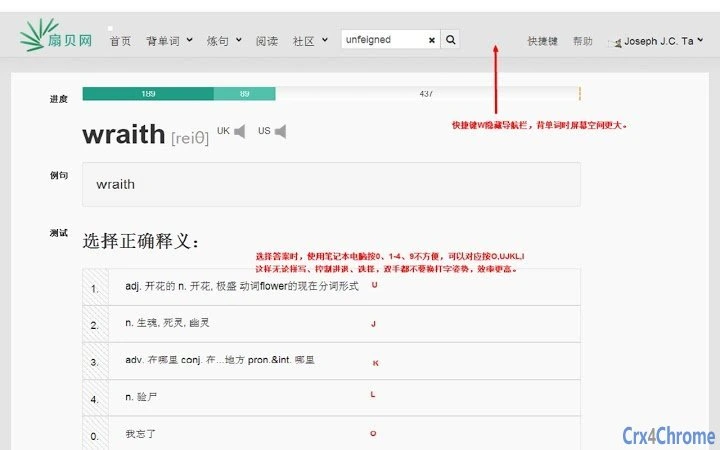

Enhanced Vocabulary Learning with Shanbay Helper
The Shanbay Helper is a browser extension designed to enhance vocabulary acquisition for language learners. It integrates seamlessly with the Shanbay platform, offering tools that support efficient word memorization and deeper understanding of language patterns. The software addresses common challenges such as limited word context, difficulty tracking progress, and the need for quick access to definitions and etymology.
It is particularly useful for students, educators, and self-learners aiming to expand their vocabulary through active engagement with real-world content. The extension supports users in reviewing flashcards, accessing word origins, and managing study sessions directly from their browser. Real-world usage includes studying during online reading, preparing for language exams, or reinforcing daily learning habits.
The developer did not provide additional background details beyond the project’s purpose and updates.
Key Features & Capabilities
- Real-time Word Lookup – Enables instant definition access by highlighting text on any webpage, supporting efficient learning during reading or research.
- Etymology and Word Roots – Provides detailed breakdowns of word origins and morphological components, helping users understand how words are formed and related.
- Customizable Keyboard Shortcuts – Allows users to assign personalized keys for actions like adding words to flashcards, opening definitions, or navigating study tools.
- Flashcard and Note Integration – Supports direct linking to user-created notes and flashcards on Shanbay, streamlining review and retention.
- Compatibility with Shanbay Platform – Maintains functionality across updates to the Shanbay website, ensuring consistent performance over time.
These features support a dynamic learning workflow. For example, a user reading an article can highlight an unfamiliar word, instantly view its definition and origin, and save it to a flashcard with a single keystroke. This reduces friction between discovery and retention. The extension also improves study efficiency by minimizing context switching, allowing learners to stay engaged with content while building vocabulary. The developer did not specify performance impact or resource usage details.
User Interface, Workflow & Performance
The user interface is minimal and integrated directly into the browser environment. It operates through popup panels that appear upon selecting text, with options for definitions, flashcards, and notes. Navigation is straightforward, relying on keyboard shortcuts and context menus.
The workflow is designed to be non-intrusive, allowing users to continue browsing while accessing study tools. The extension maintains a clean layout with essential functions prioritized. Stability is maintained through regular updates addressing bugs and compatibility issues.
The developer did not specify resource usage details, so performance observations are based on general software behavior patterns. No reported crashes or slowdowns were documented in the release notes. Users can expect consistent behavior during typical usage scenarios.
Compatibility & System Requirements
The Shanbay Helper is compatible with Windows, Mac, and Linux operating systems. It is designed as a Chrome extension, requiring the Chrome browser for installation and operation. The installation size is 1.5 MB, which is relatively lightweight.
The software version is 1.14, released on March 9, 2019. The developer did not specify exact system requirements or hardware specifications. Compatibility information was partially provided, with support confirmed for major desktop platforms and the Chrome browser.
No additional dependencies were mentioned. The extension is intended for use in web-based learning environments, particularly on the Shanbay platform.
Pros and Cons
Pros
- Lightweight installation at just 1.5 MB
- Direct integration with the Shanbay learning platform
- Supports etymology and word root exploration
- Customizable keyboard shortcuts for efficient workflow
- Free to use with no licensing restrictions
Cons
- Only compatible with Chrome browser
- Requires Shanbay account for full functionality
- No official support for mobile platforms
- Developer did not provide detailed system requirements
- Updates are infrequent, with the latest release in 2019
FAQ Section
Is the Shanbay Helper available for browsers other than Chrome?
The extension is currently designed for Chrome. No official support for other browsers was mentioned in the provided information.
Can I use the tool without a Shanbay account?
Full functionality requires a Shanbay account. Basic features like word lookup may work, but access to flashcards and notes depends on account integration.
Is the software safe to install?
As a Chrome extension from a publicly maintained project, it operates within standard browser security policies. Users should install from official sources to ensure integrity.
How often are updates released?
Updates are infrequent, with the most recent version released in 2019. The developer has not announced a regular update schedule.
Does the tool work offline?
The Shanbay Helper requires an active internet connection to access definitions, flashcards, and user data. Offline functionality was not specified.
Final Thoughts + CTA
The Shanbay Helper remains a practical tool for language learners who rely on the Shanbay platform. Its focus on vocabulary building, word etymology, and seamless integration with study workflows makes it a valuable asset for consistent learning. While it lacks recent updates and mobile support, its lightweight design and free access continue to offer real benefits.
The extension is ideal for students, educators, and self-directed learners seeking to enhance their vocabulary through active web-based study. Despite its age, it maintains relevance through stable core functionality. Download Shanbay Helper now to streamline your language learning experience.







